Showing posts with label Hibernate tutorial. Show all posts

Saturday, February 2, 2013

Hibernate one to many mapping example

This is 4 of 8 parts of tutorial series

Tutorial Content:

Part-1:Introduction to hibernate framework
Part-2:Hibernate hello world example in eclipse
Part-3:Hibernate one to one mapping example
Part-4:Hibernate one to many mapping example
Part-5:Hibernate many to many mapping example
Part-6:Hibernate inheritance:Table per class hierarchy
Part-7:Hibernate inheritance:table per subclass
Part-8:Hibernate inheritance:Table per concrete class
 
In this example we will see how to implement one to many relationship using annotations.
Lets take example of Country and state.One Country can have n number of states.Following is relationship diagram among them.


Now to create above tables in database, you need to create two java files i.e. Country.java and State.java.

1.Country.java

Country class will be used to create COUNTRY table in database.
Create Country.java in src->org.arpit.javapostsforlearning.

package org.arpit.javapostsforlearning;
import java.util.ArrayList;
import java.util.Collection;
import javax.persistence.CascadeType;
import javax.persistence.Column;
import javax.persistence.Entity;
import javax.persistence.Id;
import javax.persistence.JoinColumn;
import javax.persistence.JoinTable;
import javax.persistence.OneToMany;
import javax.persistence.Table;

@Entity
@Table(name="COUNTRY")
public class Country {

@Id
@Column(name="Country_Name")
String countryName ;

@OneToMany(cascade=CascadeType.ALL)
@JoinTable(name="COUNTRY_STATE",joinColumns={@JoinColumn(name="Country_Name")},inverseJoinColumns={@JoinColumn(name="State_Name")})
Collection<State> listOfStates=new ArrayList<State>();

@Column(name="Country_Population")
long countryPopulation;

public Country()
{

}

public Country(String countryName, long countryPopulation) {
this.countryName = countryName;
this.countryPopulation = countryPopulation;
}

public long getCountryPopulation() {
return countryPopulation;
}

public void setCountryPopulation(long countryPopulation) {
this.countryPopulation = countryPopulation;
}

public String getCountryName() {
return countryName;
}

public void setCountryName(String countryName) {
this.countryName = countryName;
}

public Collection<State> getListOfStates() {
return listOfStates;
}

public void setListOfStates(Collection<State> listOfStates) {
this.listOfStates = listOfStates;
}
}

The @OneToMany annotation is used to create the one-to-many relationship between the Country and State entities. The @JoinTable annotation is used to create the COUNTRY_STATE link table and @JoinColumn annotation is used to refer the linking columns in both the tables.

2.State.java

State class will be used to create STATE table in database.
Create State.java in src->org.arpit.javapostsforlearning.

package org.arpit.javapostsforlearning;import javax.persistence.Column;
import javax.persistence.Column;
import javax.persistence.Entity;
import javax.persistence.Id;
import javax.persistence.Table;

@Entity
@Table(name="STATE")
public class State {

@Id
@Column(name="State_Name")
private String stateName;
@Column(name="State_Population")
long statePopulation;

public State()
{

}
public State(String stateName, long statePopulation) {
super();
this.stateName = stateName;
this.statePopulation = statePopulation;
}

public String getStateName() {
return stateName;
}

public void setStateName(String stateName) {
this.stateName = stateName;
}

public long getStatePopulation() {
return statePopulation;
}

public void setStatePopulation(long statePopulation) {
this.statePopulation = statePopulation;
}
}

3.Hiberante.cfg.xml:

Create a file named "hibernate.cfg.xml" in src folder.
<?xml version='1.0' encoding='utf-8'?>
<!DOCTYPE hibernate-configuration PUBLIC
"-//Hibernate/Hibernate Configuration DTD 3.0//EN"
"http://hibernate.sourceforge.net/hibernate-configuration-3.0.dtd">

<hibernate-configuration>

<session-factory>

<!-- Database connection settings -->
<property name="connection.driver_class">com.microsoft.sqlserver.jdbc.SQLServerDriver</property>
<property name="connection.url">jdbc:sqlserver://localhost:1433;database=UserInfo</property>
<property name="connection.username">sa</property>
<property name="connection.password"></property>

<!-- JDBC connection pool (use the built-in) -->
<property name="connection.pool_size">1</property>

<!-- SQL dialect -->
<property name="dialect">org.hibernate.dialect.SQLServer2005Dialect</property>

<!-- Enable Hibernate's automatic session context management -->
<property name="current_session_context_class">thread</property>

<!-- Disable the second-level cache -->
<property name="cache.provider_class">org.hibernate.cache.NoCacheProvider</property>

<!-- Echo all executed SQL to stdout -->
<property name="show_sql">true</property>

<!-- Drop and re-create the database schema on startup -->
<property name="hbm2ddl.auto">create</property>

<mapping class="org.arpit.javapostsforlearning.Country"></mapping>
<mapping class="org.arpit.javapostsforlearning.State"></mapping>

</session-factory>

</hibernate-configuration>

4.Main Class:

package org.arpit.javapostsforlearning;

import org.hibernate.Session;
import org.hibernate.SessionFactory;
import org.hibernate.cfg.Configuration;
import org.hibernate.service.ServiceRegistry;
import org.hibernate.service.ServiceRegistryBuilder;

public class HibernateMain {

public static void main(String[] args) {

Country countryIndia=new Country("India",50000000);

State mpState=new State("Madhya Pradesh",1000000);
State maharastraState=new State("Maharastra",2000000);

countryIndia.getListOfStates().add(mpState);
countryIndia.getListOfStates().add(maharastraState);

Configuration configuration=new Configuration();
configuration.configure();
ServiceRegistry sr= new ServiceRegistryBuilder().applySettings(configuration.getProperties()).buildServiceRegistry();
SessionFactory sf=configuration.buildSessionFactory(sr);
Session ss=sf.openSession();

ss.beginTransaction();
ss.save(countryIndia);
ss.getTransaction().commit();
ss.close();

}

}

Project Struture:


5.Run it:

When you run it,you will get following output.

Hibernate: create table COUNTRY (Country_Name varchar(255) not null, Country_Population bigint, primary key (Country_Name))
Hibernate: create table COUNTRY_STATE (Country_Name varchar(255) not null, State_Name varchar(255) not null, unique (State_Name))
Hibernate: create table STATE (State_Name varchar(255) not null, State_Population bigint, primary key (State_Name))
Hibernate: alter table COUNTRY_STATE add constraint FKA1E1226881D857C0 foreign key (State_Name) references STATE
Hibernate: alter table COUNTRY_STATE add constraint FKA1E1226865CEDD60 foreign key (Country_Name) references COUNTRY
Feb 02, 2013 10:26:07 PM org.hibernate.tool.hbm2ddl.SchemaExport execute
INFO: HHH000230: Schema export complete
Hibernate: select state_.State_Name, state_.State_Population as State2_1_ from STATE state_ where state_.State_Name=?
Hibernate: insert into COUNTRY (Country_Population, Country_Name) values (?, ?)
Hibernate: insert into STATE (State_Population, State_Name) values (?, ?)
Hibernate: insert into COUNTRY_STATE (Country_Name, State_Name) values (?, ?)


6.SQL output:

COUNTRY table in database


STATE table in database


COUNTRY_STATE table is created to link above two tables.


Source code:

Hibernate one to one mapping example

This is 3 of 8 parts of tutorial series

Tutorial Content:

Part-1:Introduction to hibernate framework
Part-2:Hibernate hello world example in eclipse
Part-3:Hibernate one to one mapping example
Part-4:Hibernate one to many mapping example
Part-5:Hibernate many to many mapping example
Part-6:Hibernate inheritance:Table per class hierarchy
Part-7:Hibernate inheritance:table per subclass
Part-8:Hibernate inheritance:Table per concrete class
 
In this example, we will see how to implement one to one relationship using annotations.
Lets take example of Country and Capital.One Country has one capital.Following is relationship diagram among them.


Now to create above tables in database, you need to create two java files i.e. Country.java and Capital.java.

1.Country.java

Country class will be used to create COUNTRY table in database.
Create Country.java in src->org.arpit.javapostsforlearning.

package org.arpit.javapostsforlearning;
import javax.persistence.Column;
import javax.persistence.Entity;
import javax.persistence.Id;
import javax.persistence.JoinColumn;
import javax.persistence.OneToOne;
import javax.persistence.Table;

@Entity
@Table(name="COUNTRY")
public class Country {

@Id
@Column(name="Country_Name")
String countryName ;

@OneToOne
@JoinColumn(name="Capital_Name")
Capital capital;

@Column(name="Country_Population")
long countryPopulation;
 
public Country()
{

}

public Country(String countryName, long countryPopulation) {
this.countryName = countryName;
this.countryPopulation = countryPopulation;
}

public long getCountryPopulation() {
return countryPopulation;
}

public void setCountryPopulation(long countryPopulation) {
this.countryPopulation = countryPopulation;
}

public String getCountryName() {
return countryName;
}

public void setCountryName(String countryName) {
this.countryName = countryName;
}

public Capital getCapital() {
return capital;
}

public void setCapital(Capital capital) {
this.capital = capital;
}
}
@OneToOne annotation is used to create one to one relationship between Country and Capital entities.
@joinColumn
 is used to specify a mapped column for joining an entity association.

2.Capital.java

Capital class will be used to create CAPITAL table in database.
Create Capital.java in src->org.arpit.javapostsforlearning.

package org.arpit.javapostsforlearning;import javax.persistence.Column;
import javax.persistence.Entity;
import javax.persistence.Id;
import javax.persistence.Table;

@Entity
@Table(name="CAPITAL")
public class Capital {

@Id
@Column(name="Capital_Name")
String capitalName;

@Column(name="Capital_Population")
long capitalPopulation;

public Capital()
{

}
public Capital(String capitalName, long capitalPopulation) {
super();
this.capitalName = capitalName;
this.capitalPopulation = capitalPopulation;
}

public String getCapitalName() {
return capitalName;
}

public void setCapitalName(String capitalName) {
this.capitalName = capitalName;
}
public long getCapitalPopulation() {
return capitalPopulation;
}

public void setCapitalPopulation(long capitalPopulation) {
this.capitalPopulation = capitalPopulation;
}

}

3.Hiberante.cfg.xml:

Create a file named "hibernate.cfg.xml" in src folder.
<?xml version='1.0' encoding='utf-8'?>
<!DOCTYPE hibernate-configuration PUBLIC
"-//Hibernate/Hibernate Configuration DTD 3.0//EN"
"http://hibernate.sourceforge.net/hibernate-configuration-3.0.dtd">

<hibernate-configuration>

<session-factory>

<!-- Database connection settings -->
<property name="connection.driver_class">com.microsoft.sqlserver.jdbc.SQLServerDriver</property>
<property name="connection.url">jdbc:sqlserver://localhost:1433;database=UserInfo</property>
<property name="connection.username">sa</property>
<property name="connection.password"></property>

<!-- JDBC connection pool (use the built-in) -->
<property name="connection.pool_size">1</property>

<!-- SQL dialect -->
<property name="dialect">org.hibernate.dialect.SQLServer2005Dialect</property>

<!-- Enable Hibernate's automatic session context management -->
<property name="current_session_context_class">thread</property>

<!-- Disable the second-level cache -->
<property name="cache.provider_class">org.hibernate.cache.NoCacheProvider</property>

<!-- Echo all executed SQL to stdout -->
<property name="show_sql">true</property>

<!-- Drop and re-create the database schema on startup -->
<property name="hbm2ddl.auto">create</property>

<mapping class="org.arpit.javapostsforlearning.Country"></mapping>
<mapping class="org.arpit.javapostsforlearning.Capital"></mapping>

</session-factory>

</hibernate-configuration>

4.Main Class:

package org.arpit.javapostsforlearning;

import org.hibernate.Session;
import org.hibernate.SessionFactory;
import org.hibernate.cfg.Configuration;
import org.hibernate.service.ServiceRegistry;
import org.hibernate.service.ServiceRegistryBuilder;


public class HibernateMain {

public static void main(String[] args) {

Configuration configuration=new Configuration();
configuration.configure();
ServiceRegistry sr= new ServiceRegistryBuilder().applySettings(configuration.getProperties()).buildServiceRegistry();
SessionFactory sf=configuration.buildSessionFactory(sr);
Session ss=sf.openSession();

Country countryIndia=new Country("India",50000000);
Capital capitalDelhi=new Capital("Delhi",4000000);
countryIndia.setCapital(capitalDelhi);
Country countryFrance=new Country("France",20000000);
Capital capitalParis=new Capital("Paris",1000000);
countryFrance.setCapital(capitalParis);
ss.beginTransaction();
ss.save(countryIndia);
ss.save(capitalDelhi);
ss.save(countryFrance);
ss.save(capitalParis);
ss.getTransaction().commit();
ss.close();

}

}

Project Struture:


5.SQL output:

COUNTRY table in database


CAPITAL table in database


Source code:

Hibernate many to many mapping example

This is 5 of 8 parts of tutorial series

Tutorial Content:

Part-1:Introduction to hibernate framework
Part-2:Hibernate hello world example in eclipse
Part-3:Hibernate one to one mapping example
Part-4:Hibernate one to many mapping example
Part-5:Hibernate many to many mapping example
Part-6:Hibernate inheritance:Table per class hierarchy
Part-7:Hibernate inheritance:table per subclass
Part-8:Hibernate inheritance:Table per concrete class
 
In this example we will see how to implement many to many relationship using annotations.
Lets take example of Country and Language.One Country can have n number of languages and one language can be spoken by n number of countries.Following is relationship diagram among them.


Now to create above tables in database, you need to create two java files i.e. Country.java and Language.java.

1.Country.java

Country class will be used to create COUNTRY table in database.
Create Country.java in src->org.arpit.javapostsforlearning.

package org.arpit.javapostsforlearning;
import java.util.ArrayList;
import java.util.Collection;
import javax.persistence.CascadeType;
import javax.persistence.Column;
import javax.persistence.Entity;
import javax.persistence.GeneratedValue;
import javax.persistence.Id;
import javax.persistence.JoinColumn;
import javax.persistence.JoinTable;
import javax.persistence.ManyToMany;
import javax.persistence.Table;

@Entity
@Table(name="COUNTRY")
public class Country {

@Id
@GeneratedValue
@Column(name="Country_Id")
int countryId;

@Column(name="Country_Name")
String countryName ;

@ManyToMany(cascade=CascadeType.ALL)
@JoinTable(name="COUNTRY_LANGUAGE",joinColumns={@JoinColumn(name="Country_Id")},inverseJoinColumns={@JoinColumn(name="Language_Id")})
Collection<Language> languages=new ArrayList<Language>();

public Country()
{

}
public Country(String countryName) {
this.countryName=countryName;
}

public String getCountryName() {
return countryName;
}

public void setCountryName(String countryName) {
this.countryName = countryName;
}

public Collection<Language> getLanguages() {
return languages;
}

public void setLanguages(ArrayList<Language> languages) {
this.languages = languages;
}
}

The @MamyToMany annotation is used to create the many-to-many relationship between the Country and Language entities. The @JoinTable annotation is used to create the COUNTRY_LANGUAGE link table and @JoinColumn annotation is used to refer the linking columns in both the tables.

2.Langauge.java

Language class will be used to create LANGUAGE table in database.
Create Langauge.java in src->org.arpit.javapostsforlearning.

package org.arpit.javapostsforlearning;import javax.persistence.Column;
import java.util.ArrayList;
import java.util.Collection;
import javax.persistence.Column;
import javax.persistence.Entity;
import javax.persistence.GeneratedValue;
import javax.persistence.Id;
import javax.persistence.ManyToMany;
import javax.persistence.Table;

@Entity
@Table(name="LANGUAGE")
public class Language {

@Id
@GeneratedValue
@Column(name="Language_Id")
int languageId;

@Column(name="Language_Name")
String languageName;

@ManyToMany(mappedBy="languages")
Collection<Country> languageSpeakingCountries=new ArrayList<Country>();

public Language()
{

}
public Language(String languageName) {
this.languageName=languageName;
}

public String getLanguageName() {
return languageName;
}

public void setLanguageName(String languageName) {
this.languageName = languageName;
}

public Collection<Country> getLanguageSpeakingCountries() {
return languageSpeakingCountries;
}

public void setLanguageSpeakingCountries(ArrayList<Country> languageSpeakingCountries) {
this.languageSpeakingCountries = languageSpeakingCountries;
}
}

3.Hiberante.cfg.xml:

Create a file named "hibernate.cfg.xml" in src folder.
<?xml version='1.0' encoding='utf-8'?>
<!DOCTYPE hibernate-configuration PUBLIC
"-//Hibernate/Hibernate Configuration DTD 3.0//EN"
"http://hibernate.sourceforge.net/hibernate-configuration-3.0.dtd">

<hibernate-configuration>

<session-factory>

<!-- Database connection settings -->
<property name="connection.driver_class">com.microsoft.sqlserver.jdbc.SQLServerDriver</property>
<property name="connection.url">jdbc:sqlserver://localhost:1433;database=UserInfo</property>
<property name="connection.username">sa</property>
<property name="connection.password"></property>

<!-- JDBC connection pool (use the built-in) -->
<property name="connection.pool_size">1</property>

<!-- SQL dialect -->
<property name="dialect">org.hibernate.dialect.SQLServer2005Dialect</property>

<!-- Enable Hibernate's automatic session context management -->
<property name="current_session_context_class">thread</property>

<!-- Disable the second-level cache -->
<property name="cache.provider_class">org.hibernate.cache.NoCacheProvider</property>

<!-- Echo all executed SQL to stdout -->
<property name="show_sql">true</property>

<!-- Drop and re-create the database schema on startup -->
<property name="hbm2ddl.auto">create</property>

<mapping class="org.arpit.javapostsforlearning.Country"></mapping>
<mapping class="org.arpit.javapostsforlearning.Language"></mapping>

</session-factory>

</hibernate-configuration>

4.Main Class:

package org.arpit.javapostsforlearning;

import org.hibernate.Session;
import org.hibernate.SessionFactory;
import org.hibernate.cfg.Configuration;
import org.hibernate.service.ServiceRegistry;
import org.hibernate.service.ServiceRegistryBuilder;

public class HibernateMain {

public static void main(String[] args) {

Country country=new Country("India");

Language hindiLan=new Language("Hindi");
hindiLan.getLanguageSpeakingCountries().add(country);

Language engLan=new Language("English");
engLan.getLanguageSpeakingCountries().add(country);

country.getLanguages().add(hindiLan);
country.getLanguages().add(engLan);

Configuration configuration=new Configuration();
configuration.configure();
ServiceRegistry sr= new ServiceRegistryBuilder().applySettings(configuration.getProperties()).buildServiceRegistry();
SessionFactory sf=configuration.buildSessionFactory(sr);
Session ss=sf.openSession();

ss.beginTransaction();
ss.save(country);
ss.getTransaction().commit();
ss.close();

}
}

Project Struture:


5.Run it:

When you run it,you will get following output.

Hibernate: create table COUNTRY (Country_Id int identity not null, Country_Name varchar(255), primary key (Country_Id))
Hibernate: create table COUNTRY_LANGUAGE (Country_Name int not null, Language_Name int not null)
Hibernate: create table LANGUAGE (Language_Id int identity not null, Language_Name varchar(255), primary key (Language_Id))
Hibernate: alter table COUNTRY_LANGUAGE add constraint FK67645601403CB4F4 foreign key (Language_Name) references LANGUAGE
Hibernate: alter table COUNTRY_LANGUAGE add constraint FK6764560165CEDD60 foreign key (Country_Name) references COUNTRY
Feb 03, 2013 12:07:59 AM org.hibernate.tool.hbm2ddl.SchemaExport execute
INFO: HHH000230: Schema export complete
Hibernate: insert into COUNTRY (Country_Name) values (?)
Hibernate: insert into LANGUAGE (Language_Name) values (?)
Hibernate: insert into COUNTRY_LANGUAGE (Country_Name, Language_Name) values (?, ?)

5.SQL output:

COUNTRY table in database


LANGUAGE table in database


COUNTRY_LANGUAGE table is created to link above two tables.


Source code:

Wednesday, January 30, 2013

Introduction to hibernate framework

Target Audience

This tutorial is designed for Java programmers who need to understand the Hibernate framework and its application.

Prerequisites:

Before proceeding with this tutorial you should have a good understanding of the Java programming language and also good understanding of SQL.
This is 1 of 8 parts of tutorial series

Tutorial Content:

Part-1:Introduction to hibernate framework
Part-2:Hibernate hello world example in eclipse
Part-3:Hibernate one to one mapping example
Part-4:Hibernate one to many mapping example
Part-5:Hibernate many to many mapping example
Part-6:Hibernate inheritance:Table per class hierarchy
Part-7:Hibernate inheritance:table per subclass
Part-8:Hibernate inheritance:Table per concrete class
 
Before understanding hibernate framework,we need to understand Object Relational Mapping(ORM).

What is ORM?

ORM is a programming method to map the objects in java with the relational entities in the database.In this,entities/classes refers to table in database,instance of classes refers to rows and attributes of instances of classes refers to column of table in database.This provides solutions to the problems arise while developing persistence applications using traditional JDBC method. This also reduces the code that needs to be written.

Need for tools like hibernate:

The main advantage of ORM like hibernate is that it shields developers from messy SQL. Apart from this, ORM provides following benefits:
Improved productivity:
  • High-level object-oriented API 
  • Less Java code to write 
  • No SQL to write 
Improved performance:
  • Sophisticated caching 
  • Lazy loading 
  • Eager loading 
Improved maintainability:
  • A lot less code to write 
Improved portability:
  • ORM framework generates database-specific SQL for you 

What is hibernate?

Hibernate is a pure Java object-relational mapping (ORM) and persistence framework that allows you to map plain old Java objects to relational database tables.The main goal of hibernate is to relieve the developer from the common data persistence related tasks.It maps the objects in the java with the tables in the database very efficiently and also you can get maximum using its data query and retrieval facilities.Mainly by using Hibernate in your projects you can save incredible time and effort.

Architecture of hibernate :

Following is a detailed view of the Hibernate Application Architecture with few important core classes.

The Hibernate architecture is layered to keep you isolated from having to know the underlying APIs.Hibernate is like a bridge between java application and relational database.

Core classes of hibernate are:

Session Interface: 

This is the primary interface used by hibernate applications. The instances of this interface are lightweight and are inexpensive to create and destroy. Hibernate sessions are not thread safe.It allows you to create query objects to retrieve persistent objects.It wraps JDBC connection Factory for Transaction.It holds a mandatory (first-level) cache of persistent objects, used when navigating the object graph or looking up objects by identifier .
Session session=SessionFactory.openConnection();
SessionFactory Interface :
This is a factory that delivers the session objects to hibernate application.It is a heavy weighted object so generally there will be a single SessionFactory for the whole application and it will be shared among all the application threads.The SessionFactory caches generate SQL statements and other mapping metadata that Hibernate uses at runtime. It also holds cached data that has been read in one unit of work and may be reused in a future unit of work.
Configuration configuration=new Configuration();
configuration.configure();
ServiceRegistry sr= new ServiceRegistryBuilder().applySettings(configuration.getProperties()).buildServiceRegistry();
SessionFactory sf=configuration.buildSessionFactory(sr);
SessionFactory object is created with the help of configuration object.

Configuration Interface :

This is used to configure hibernate. It’s also used to bootstrap hibernate. Mapping documents of hibernate are located using this interface.

Transaction Interface :

This is an optional interface but the above three interfaces are mandatory in each and every application. This interface abstracts the code from any kind of transaction implementations such as JDBC transaction, JTA transaction.

Query and Criteria Interface :

This interface allows the user to perform queries and also control the flow of the query execution.

Configuring hibernate in eclipse

After basic understanding of hibernate framework.We are ready to start working on hibernate In this post,we will configure hibernate in eclipse.For configuring hibernate,there are some prerequisites which you need to have on your system.
  1. Download hibernate framework.(I am using here latest hibernate version 4.1.9)
  2. Download any database.(I am using here sql server 2005)
  3. Download JDBC driver for database(I have downloaded jdbc driver for sql server 2005)
  4. Eclipse ide
  5. JDK 1.5 or above
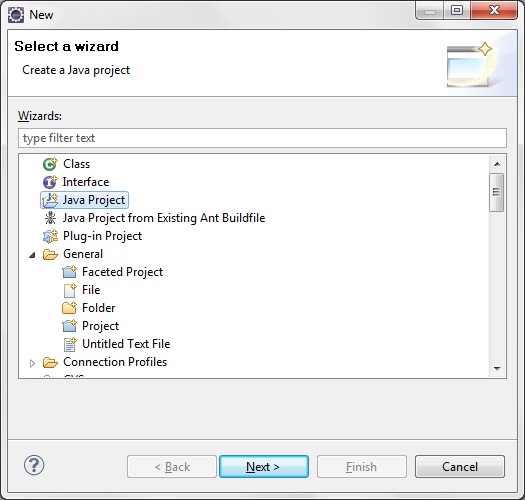
Now,In eclipse IDE,click on File->new
 Click on other and then select java project


Click on next and  Write project name.I have writtern here "Hibernate4HelloWorldProject"


Click on finish and now our project is created
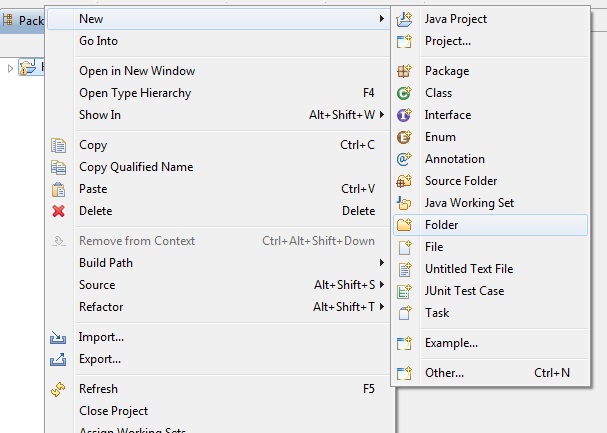
Create new folder "jars" under src folder so for that right click on project->new->folder
 Write folder name as "jars"
click on finish and empy jar folder will be created in src folder.
Now we will add the hibernate 4 libraries to the project. Extract the "hibernate-release-4.1.9.Final" file if you have not extracted. Now go to the "hibernate-release-4.1.9.Final->lib->required" directory and then copy all the jar files (Ctrl+C) and paste on the jars directory (of our project) in the Eclipse IDE.
Also download jdbc driver for your database and copy that jar to jars
Note- location of above jar files may vary from versions to versions. So if you are using other versions than 4.1.9 then you need to find jars in that version.

Now add all the jars to "Java Build Path". Right click on the "Hibernate4HelloWorldProject" in project explorer and then select properties. Then select "Java Build Path" --> Libraries and then click on the "Add JARs" button. And add all the libraries to Java Build Path.

Click on OK.

Now you are done with configuring hibernate in eclipse.You can create your first hibernate project.
In next post we will write 


Hibernate hello world example in eclipse

This is 2 of 8 parts of tutorial series

Tutorial Content:

Part-1:Introduction to hibernate framework
Part-2:Hibernate hello world example in eclipse
Part-3:Hibernate one to one mapping example
Part-4:Hibernate one to many mapping example
Part-5:Hibernate many to many mapping example
Part-6:Hibernate inheritance:Table per class hierarchy
Part-7:Hibernate inheritance:table per subclass
Part-8:Hibernate inheritance:Table per concrete class
 
After basic understanding of hibernate framework.We are ready to start working on hibernate In this post,we will configure hibernate in eclipse and write our first hibernate program.For configuring hibernate,there are some prerequisites which you need to have on your system.
  1. Download hibernate framework.(I am using here latest hibernate version 4.1.9)
  2. Download any database.(I am using here sql server 2005)
  3. Download JDBC driver for database(I have downloaded jdbc driver for sql server 2005)
  4. Eclipse ide
  5. JDK 1.5 or above
Now,In eclipse IDE,click on File->new
 Click on other and then select java project


Click on next and  Write project name.I have writtern here "Hibernate4HelloWorldProject"


Click on finish and now our project is created
Create new folder "jars" under src folder so for that right click on project->new->folder
 Write folder name as "jars"
click on finish and empy jar folder will be created in src folder.
Now we will add the hibernate 4 libraries to the project. Extract the "hibernate-release-4.1.9.Final" file if you have not extracted. Now go to the "hibernate-release-4.1.9.Final->lib->required" directory and then copy all the jar files (Ctrl+C) and paste on the jars directory (of our project) in the Eclipse IDE.
Also download jdbc driver for your database and copy that jar to jars
Note- location of above jar files may vary from versions to versions. So if you are using other versions than 4.1.9 then you need to find jars in that version.

Now add all the jars to "Java Build Path". Right click on the "Hibernate4HelloWorldProject" in project explorer and then select properties. Then select "Java Build Path" --> Libraries and then click on the "Add JARs" button. And add all the libraries to Java Build Path.

Click on OK.
you are done with configuring hibernate in eclipse.

Now we will write our first hibernate application.For configuring hibernate in eclipse,please refer previous post.I am using SQL server 2005 as database.
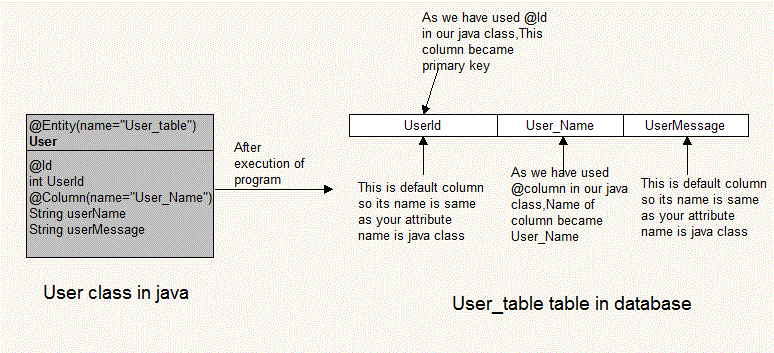
We will make User_table table in database using hibernate.
  
We will create User.java for creating above table in database.

1.User.java(Entity)

An entity can be considered as a lightweight persistence domain object. An entity defines a table in a relational database and each instance of an entity corresponds to a row in that table. An entity refers to a logical collection of data that can be stored or retrieved as a whole.

Create a new package org.arpit.javapostsforlearning to hold the java files. Right click on the "src" folder and then select New --> Package. Then provide the package name as org.arpit.javapostsforlearning and click on the "Finish" button. 

Create a new Java file User.java under the package org.arpit.javapostsforlearning and add the following code:

package org.arpit.javapostsforlearning;

import javax.persistence.Column;
import javax.persistence.Entity;
import javax.persistence.GeneratedValue;
import javax.persistence.Id;

@Entity(name="User_table")
public class User {
@Id
int userId;
@Column(name="User_Name")
String userName;

String userMessage;
public int getUserId() {
return userId;
}
public void setUserId(int userId) {
this.userId = userId;
}
public String getUserName() {
return userName;
}
public void setUserName(String userName) {
this.userName = userName;
}
public String getUserMessage() {
return userMessage;
}
public void setUserMessage(String userMessage) {
this.userMessage = userMessage;
}

}

@Entity is used for making a persistent pojo class.For this java class,you want to create a table in database.
@Entity(name="User_table") specify that create a table named "User_table" in database

2.Hibernate configuration XML:

After configuring hibernate in eclipse,we need to configure "hibernate.cfg.xml" for database configuration and other related parameters.By default,hibernate searches for a configuration file in a project's root directory.Create a file named "hibernate.cfg.xml" in src folder.
<?xml version='1.0' encoding='utf-8'?> <!DOCTYPE hibernate-configuration PUBLIC "-//Hibernate/Hibernate Configuration DTD 3.0//EN" "http://hibernate.sourceforge.net/hibernate-configuration-3.0.dtd">
<hibernate-configuration>

    <session-factory>

        <!-- Database connection settings -->
        <property name="connection.driver_class">com.microsoft.sqlserver.jdbc.SQLServerDriver</property>
        <property name="connection.url">jdbc:sqlserver://localhost:1433;database=UserInfo</property>
        <property name="connection.username">sa</property>
        <property name="connection.password"></property>

        <!-- JDBC connection pool (use the built-in) -->
        <property name="connection.pool_size">1</property>

        <!-- SQL dialect -->
        <property name="dialect">org.hibernate.dialect.SQLServer2005Dialect</property>

        <!-- Echo all executed SQL to stdout -->
        <property name="show_sql">true</property>

        <!-- Drop and re-create the database schema on startup -->
        <property name="hbm2ddl.auto">create</property>

        <mapping class="org.arpit.javapostsforlearning.User"></mapping>

    </session-factory>

</hibernate-configuration>
<property name="connection.driver_class">: Need to specify  JDBC driver class.
<property name="hibernate.connection.url "> :specify JDBC URL to the database instance.
<property name="hibernate.connection.username " >:Specify database username
<property name="hibernate.connection.password" >:Specify database password
<property name="hibernate.connection.dialect" >:This property makes Hibernate generate the appropriate SQL for the chosen database.
 <property name="hibernate.connection.pool_size " >:This property limits the number of connections waiting in the Hibernate database connection pool.
 <property name="show_sql" >:If you specify this property to be true then all sql statement will be printed to console.
<property name="hbm2ddl.auto" >:It specify operation on your database schema.Whether to drop and recreate your database schema or update current schema.
<mapping class="org.arpit.javapostsforlearning.User" >:Here you need to specify all java classes for which you want to create a table in database.You need to specify all entity classes here.

3.Main class:

Create a class named "HibernateMain.java" in src->org.arpit.javapostsforlearning

package org.arpit.javapostsforlearning;

import org.hibernate.Session;
import org.hibernate.SessionFactory;
import org.hibernate.cfg.Configuration;
import org.hibernate.service.ServiceRegistry;
import org.hibernate.service.ServiceRegistryBuilder;

public class HibernateMain {

public static void main(String[] args) {

Configuration configuration=new Configuration();
configuration.configure();
ServiceRegistry sr= new ServiceRegistryBuilder().applySettings(configuration.getProperties()).buildServiceRegistry();
SessionFactory sf=configuration.buildSessionFactory(sr);

User user1=new User();
user1.setUserName("Arpit");
user1.setUserMessage("Hello world from arpit");

User user2=new User();
user2.setUserName("Ankita");
user2.setUserMessage("Hello world from ankita");
Session ss=sf.openSession();
ss.beginTransaction();
//saving objects to session
ss.save(user1);
ss.save(user2);
ss.getTransaction().commit();
ss.close();

}

}
As we have discussed in our previous post,we have to create SessionFactory instance in order to communicate with Database in Hibernate

Project structure:

 4.Run it:

When you will run this application.You will get following output.

Hibernate: drop table User_table
Hibernate: create table User_table (userId int identity not null, userMessage varchar(255), User_Name varchar(255), primary key (userId))
Jan 29, 2013 9:38:32 PM org.hibernate.tool.hbm2ddl.SchemaExport execute
INFO: HHH000230: Schema export complete
Hibernate: insert into User_table (userMessage, User_Name) values (?, ?)
After execution of above program,you can check User_table table in your database.

5.SQL output:

Source code: