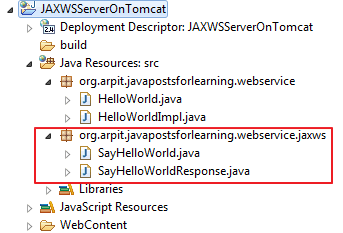
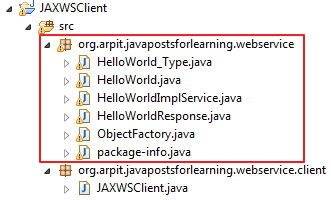
In this tutorial,we will see how we can develop JAX-WS endpoint and client step by step.
2) Create java project named "JAXWSServer"

3)Create new package named "org.arpit.javapostsforlearning.webservice"
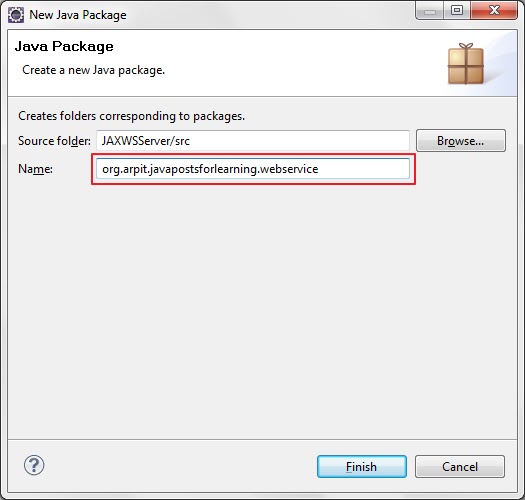
4)Create JAXWSService Endpoint Interface.
HelloWorld.java
HelloWorldImpl.java
HelloWorldWSPublisher.java
1)Open eclipse and create a new java project JAXWSClient.
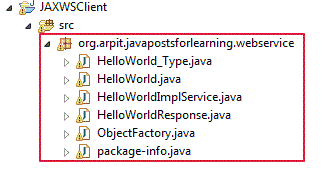
 3) Now we need to generate the client stubs.So open your command line, and enter the wsimport command:
 4) Lets create client class now.
create JAXWSClient.java under src->org.arpit.javapostsforlearning.webservice.client
Congratulation,you have successfully created web service endpoint and client.Now in next post,we will deploy it on Tomcat.
Web service Tutorial Content:
Part-1:Introduction to web services
Part-2:SOAP web service introduction
Part-3:RESTful web service introduction
Part-4:SOAP web service example in java using eclipse
Part-5:JAX-WS web service eclipse tutorial
Part-6:JAX-WS web service deployment on tomcat
Part-7:Create RESTful web service in java(JAX-RS) using jersey
Prerequisites:
- JDK 1.6
- Eclipse IDE
Steps for creating JAX-WS webservice endpoint.
1) Open Eclipse IDE2) Create java project named "JAXWSServer"
3)Create new package named "org.arpit.javapostsforlearning.webservice"
4)Create JAXWSService Endpoint Interface.
HelloWorld.java
package org.arpit.javapostsforlearning.webservice;5)Create JAXWSService Endpoint implementation class.
import javax.jws.WebMethod;
import javax.jws.WebService;
@WebService
public interface HelloWorld {
@WebMethod public String helloWorld(String name);
}
HelloWorldImpl.java
package org.arpit.javapostsforlearning.webservice;6) Create Endpoint publisher.
import javax.jws.WebService;
@WebService(endpointInterface="org.arpit.javapostsforlearning.webservice.HelloWorld")
public class HelloWorldImpl implements HelloWorld{
public String helloWorld(String name) {
return "Hello world from "+name;
}
}
HelloWorldWSPublisher.java
package org.arpit.javapostsforlearning.webservice;Run above program.Your webservice is published.You can check your service wsdl at http://localhost:8080/WS/HelloWorld?wsdl
import javax.xml.ws.Endpoint;
public class HelloWorldWSPublisher {
public static void main(String[] args) {
Endpoint.publish("http://localhost:8080/WS/HelloWorld",new HelloWorldImpl());
}
}
Steps for creating JAXWS Client
1)Open eclipse and create a new java project JAXWSClient.
cd %project_home%/srcyou will find java classes generated and compiled under src->org->arpit->javapostsforlearning->webservice
wsimport -s . http://localhost:8080/WS/HelloWorld?wsdl
create JAXWSClient.java under src->org.arpit.javapostsforlearning.webservice.client
package org.arpit.javapostsforlearning.webservice.client;5) Run above program and you will get following output.
import org.arpit.javapostsforlearning.webservice.HelloWorld;
import org.arpit.javapostsforlearning.webservice.HelloWorldImplService;
public class JAXWSClient {
/**
* @author Arpit Mandliya
*/
public static void main(String[] args) {
HelloWorldImplService helloWorldService = new HelloWorldImplService();
HelloWorld helloWorld = helloWorldService.getHelloWorldImplPort();
System.out.println(helloWorld.helloWorld("Arpit"));
}
}
Hello world from Arpit
Congratulation,you have successfully created web service endpoint and client.Now in next post,we will deploy it on Tomcat.