Showing posts with label Serialization. Show all posts

Monday, March 11, 2013

serialVersionUID in java Serialization

serialVersionUID is used to ensure that same class(That was used during Serialization) is loaded during Deserialization.serialVersionUID is used for version control of object.
If you have used Serialization then You might have seen  serialVersionUID because whenever you implement Serializable interface your IDE will give you warning.

Serialversionuid Syntax:

As per java docs
ANY-ACCESS-MODIFIER static final long serialVersionUID = 42L;

serialVersionUID must be Static and final.You can assign any number to it.
Lets see an example:
Create Employee.java in src->org.arpit.javapostsforlearning

1.Employee.java
package org.arpit.javapostsforlearning;
import java.io.Serializable;
public class Employee implements Serializable{

private static final long serialVersionUID = 1L;

    int employeeId;
    String employeeName;
    String department;
   
    public int getEmployeeId() {
        return employeeId;
    }
    public void setEmployeeId(int employeeId) {
        this.employeeId = employeeId;
    }
    public String getEmployeeName() {
        return employeeName;
    }
    public void setEmployeeName(String employeeName) {
        this.employeeName = employeeName;
    }
    public String getDepartment() {
        return department;
    }
    public void setDepartment(String department) {
        this.department = department;
    }
}

Create SerializeMain.java in src->org.arpit.javapostsforlearning

2.SerializeMain.java
package org.arpit.javapostsforlearning;
import java.io.FileOutputStream;
import java.io.IOException;
import java.io.ObjectOutputStream;
 public class SerializeMain {

/**
* @author Arpit Mandliya
*/
public static void main(String[] args) {

Employee emp = new Employee();
emp.setEmployeeId(101);
emp.setEmployeeName("Arpit");
emp.setDepartment("CS");
try
{
FileOutputStream fileOut = new FileOutputStream("employee.ser");
ObjectOutputStream outStream = new ObjectOutputStream(fileOut);
outStream.writeObject(emp);
outStream.close();
fileOut.close();
}catch(IOException i)
{
i.printStackTrace();
}
}
}
Create DeserializeMain.java in src->org.arpit.javapostsforlearning
3.DeserializeMain.java
package org.arpit.javapostsforlearning;
import java.io.IOException;
import java.io.ObjectInputStream;

public class DeserializeMain {
/**
* @author Arpit Mandliya
*/
public static void main(String[] args) {

Employee emp = null;
try
{
FileInputStream fileIn =new FileInputStream("employee.ser");
ObjectInputStream in = new ObjectInputStream(fileIn);
emp = (Employee) in.readObject();
in.close();
fileIn.close();
}catch(IOException i)
{
i.printStackTrace();
return;
}catch(ClassNotFoundException c)
{
System.out.println("Employee class not found");
c.printStackTrace();
return;
}
System.out.println("Deserialized Employee...");
System.out.println("Emp id: " + emp.getEmployeeId());
System.out.println("Name: " + emp.getEmployeeName());
System.out.println("Department: " + emp.getDepartment());
}
}

4.Run it:

First run SerializeMain.java then DeserializeMain.java and you will get following output:
Deserialized Employee...
Emp id: 101
Name: Arpit
Department: CS
So when you run program,it was completed successfully and employee.ser has been created on disk.If you again run DeserializeMain.java,it will again run successfully. Now change value of variable serial to
 private static final long serialVersionUID = 2L;
and if you now run DeserializeMain.java it will give you following error.
java.io.InvalidClassException: org.arpit.javapostsforlearning.Employee; local class incompatible: stream classdesc serialVersionUID = 1, local class serialVersionUID = 2
So here during deserialization,we got error.It complained about Serialvesionuid being changed.But how does it know? because serialversionuid is a static variable and we know that "We can not serialize static variables".How does it store  serialversionuid? yes ,there is exception.Inspite of serialversionuid being static,it get serialized.So ObjectOutputStream writes every time to output stream and ObjectInputStream reads it back and if it does not have same values as in current version of class then it throw InvalidClassException.

Why serialversionuid is required?

In real time,It is possible that you have serialized a object in a file and you deserialized it after few months on different JVM.In between serialization and deserialization class declaration has been changed.So it is a good idea to maintain version system and serialversionid does exactly same thing.It checks if you are deserializing same object which you have serialized.

Best Practices:

Java docs says:
"the default serialVersionUID computation is highly sensitive to class details that may vary depending on compiler implementations, and can thus result in unexpected InvalidClassExceptions during deserialization".

So it says you must declare serialVersionUID because it give us more control.for e.g. Default rules for generating serialVersionUID can be too strict in some cases. For example when the visibility of a field changes, the serialVersionUID changes too. or sometimes you just want to forbid deserialization of old serialized object then you can just change serialVersionUID.

Is this enough?.No,you must not only declare it but also maintain it.So most important part is maintaining  serialVersionUID otherwise every thing will run without any exceptions.You should change serialVersionUID when there is some change in the definition of data stored in the class for example data type of field is changed.

Saturday, March 9, 2013

Serialization in java

Java provides mechanism called serialization to persists java objects in a form of ordered or sequence of bytes that includes the object's data as well as information about the object's type and the types of data stored in the object.

So if we need to serialize any object then it can be read and deserialize it using object's type and other information so we can retrieve original object.

Classes ObjectInputStream and ObjectOutputStream are high-level streams that contain the methods for serializing and deserializing an object.
ObjectOutputStream has many method for serializing object but commonly used method is
    private void writeObject(ObjectOutputStream os) throws IOException
    {
       
    }
Similarly ObjectInputStream has
    private void readObject(ObjectInputStream is) throws IOException, ClassNotFoundException
    {
       
    }

Need of Serialization?

Serialization is usually used when there is need to send your data over network or to store in files. By data I mean objects and not text.

Now the problem is your Network infrastructure and your Hard disk are hardware components that understand bits and bytes but not Java objects.

Serialization is the translation of Java object's values/states to bytes to send it over network or to save it.On other hand,Deserialization is conversion of byte code to corresponding java objects.

Concept of serialVersionUID :

serialVersionUID is used to ensure that same class(That was used during Serialization) is loaded during Deserialization.serialVersionUID is used for version control of object.You can read more at serialVersionUID in java serialization


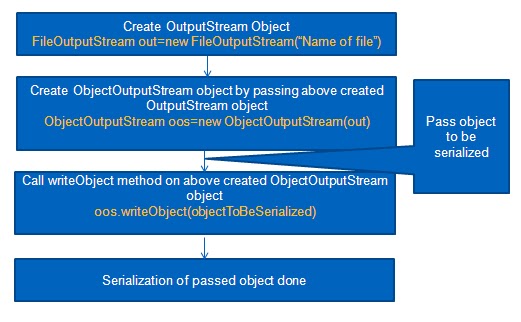
For Serialization:
steps are :
Lets take an example:
Create Employee.java in src->org.arpit.javapostsforlearning

1.Employee.java
package org.arpit.javapostsforlearning;
import java.io.Serializable;
public class Employee implements Serializable{ 
private static final long serialVersionUID = 1L;    
 int employeeId;
    String employeeName;
    String department;
   
    public int getEmployeeId() {
        return employeeId;
    }
    public void setEmployeeId(int employeeId) {
        this.employeeId = employeeId;
    }
    public String getEmployeeName() {
        return employeeName;
    }
    public void setEmployeeName(String employeeName) {
        this.employeeName = employeeName;
    }
    public String getDepartment() {
        return department;
    }
    public void setDepartment(String department) {
        this.department = department;
    }
}
As you can see above,if you want to serialize any class then it must implement Serializable interface which is marker interface.
Marker interface in Java is interfaces with no field or methods or in simple word empty interface in java is called marker interface
Create SerializeMain.java in src->org.arpit.javapostsforlearning

2.SerializeMain.java
package org.arpit.javapostsforlearning;
import java.io.FileOutputStream;
import java.io.IOException;
import java.io.ObjectOutputStream;
 public class SerializeMain {

/**
* @author Arpit Mandliya
*/
public static void main(String[] args) {

Employee emp = new Employee();
emp.setEmployeeId(101);
emp.setEmployeeName("Arpit");
emp.setDepartment("CS");
try
{
FileOutputStream fileOut = new FileOutputStream("employee.ser");
ObjectOutputStream outStream = new ObjectOutputStream(fileOut);
outStream.writeObject(emp);
outStream.close();
fileOut.close();
}catch(IOException i)
{
i.printStackTrace();
}
}
}

For Deserialization:

Steps are:
Create DeserializeMain.java in src->org.arpit.javapostsforlearning

3.DeserializeMain.java
package org.arpit.javapostsforlearning;
import java.io.IOException;
import java.io.ObjectInputStream;

public class DeserializeMain {
/**
* @author Arpit Mandliya
*/
public static void main(String[] args) {

Employee emp = null;
try
{
FileInputStream fileIn =new FileInputStream("employee.ser");
ObjectInputStream in = new ObjectInputStream(fileIn);
emp = (Employee) in.readObject();
in.close();
fileIn.close();
}catch(IOException i)
{
i.printStackTrace();
return;
}catch(ClassNotFoundException c)
{
System.out.println("Employee class not found");
c.printStackTrace();
return;
}
System.out.println("Deserialized Employee...");
System.out.println("Emp id: " + emp.getEmployeeId());
System.out.println("Name: " + emp.getEmployeeName());
System.out.println("Department: " + emp.getDepartment());
}
}

4.Run it:

First run SerializeMain.java then DeserializeMain.java and you will get following output:
Deserialized Employee...
Emp id: 101
Name: Arpit
Department: CS
So we have serialize an employee object and then deserialized it.It seems very simple but it can be very complex when reference object,inheritance come into the picture.So we will see different cases one by one and how we can apply serialization in different scenarios.

Case 1-What if an object has a reference to other objects

We have seen very simple case of serialization,now what if it also a reference to other objects.How will it serialized then? will reference object will also get serialized?.Yes,You don't have to explicitly serialize reference objects.When you serialize any object and if it contain any other object reference then Java serialization serialize that object's entire object graph.
For example:Lets say,Employee now has reference to address object and Address can have reference to some other object(e.g.Home) then when you serialize Employee object all other reference objects such as address and home will be automatically serialized. Lets create Address class  and add object of Address as a reference to above employee class.

Employee.java:

package org.arpit.javapostsforlearning;
import java.io.Serializable;

public class Employee implements Serializable{ 

private static final long serialVersionUID = 1L;
 int employeeId;
String employeeName;
String department;
Address address;

public int getEmployeeId() {
return employeeId;
}
public void setEmployeeId(int employeeId) {
this.employeeId = employeeId;
}
public String getEmployeeName() {
return employeeName;
}
public void setEmployeeName(String employeeName) {
this.employeeName = employeeName;
}
public String getDepartment() {
return department;
}
public void setDepartment(String department) {
this.department = department;
}
public Address getAddress() {
return address;
}
public void setAddress(Address address) {
this.address = address;
}
}

Create Address.java in org.arpit.javapostsforlearning
Address.java:
package org.arpit.javapostsforlearning;
public class Address {

int homeNo;
String street;
String city;
 public Address(int homeNo, String street, String city) {
super();
this.homeNo = homeNo;
this.street = street;
this.city = city;
}
 public int getHomeNo() {
return homeNo;
}
public void setHomeNo(int homeNo) {
this.homeNo = homeNo;
}
public String getStreet() {
return street;
}
public void setStreet(String street) {
this.street = street;
}
public String getCity() {
return city;
}
public void setCity(String city) {
this.city = city;
}
}
Create SerializeDeserializeMain.java in org.arpit.javapostsforlearning
SerializeDeserializeMain.java:
package org.arpit.javapostsforlearning;
import java.io.FileInputStream;
import java.io.FileOutputStream;
import java.io.IOException;
import java.io.ObjectInputStream;
import java.io.ObjectOutputStream;

public class SerializeDeserializeMain {
/**
* @author Arpit Mandliya
*/
public static void main(String[] args) {

Employee emp = new Employee();
emp.setEmployeeId(101);
emp.setEmployeeName("Arpit");
emp.setDepartment("CS");
Address address=new Address(88,"MG road","Pune");
emp.setAddress(address);
//Serialize
try
{
FileOutputStream fileOut = new FileOutputStream("employee.ser");
ObjectOutputStream outStream = new ObjectOutputStream(fileOut);
outStream.writeObject(emp);
outStream.close();
fileOut.close();
}catch(IOException i)
{
i.printStackTrace();
}

//Deserialize
emp = null;
try
{
FileInputStream fileIn =new FileInputStream("employee.ser");
ObjectInputStream in = new ObjectInputStream(fileIn);
emp = (Employee) in.readObject();
in.close();
fileIn.close();
}catch(IOException i)
{
i.printStackTrace();
return;
}catch(ClassNotFoundException c)
{
System.out.println("Employee class not found");
c.printStackTrace();
return;
}
System.out.println("Deserialized Employee...");
System.out.println("Emp id: " + emp.getEmployeeId());
System.out.println("Name: " + emp.getEmployeeName());
System.out.println("Department: " + emp.getDepartment());
address=emp.getAddress();
System.out.println("City :"+address.getCity());
}
}
Run it :
When you run SerializeDeserializeMain.java.You will get following output

java.io.NotSerializableException: org.arpit.javapostsforlearning.Address
    at java.io.ObjectOutputStream.writeObject0(Unknown Source)
    at java.io.ObjectOutputStream.defaultWriteFields(Unknown Source)
    at java.io.ObjectOutputStream.writeSerialData(Unknown Source)
    at java.io.ObjectOutputStream.writeOrdinaryObject(Unknown Source)
    at java.io.ObjectOutputStream.writeObject0(Unknown Source)
    at java.io.ObjectOutputStream.writeObject(Unknown Source) 
We got exception what went wrong.I forgot to mention,Address class must also be serializable.So you have to make Address serializable by implement serialzable interface.

Address.java:
import java.io.Serializable;

public class Address implements Serializable{

private static final long serialVersionUID = 1L;
int homeNo;
String street;
String city;
public Address(int homeNo, String street, String city) {
super();
this.homeNo = homeNo;
this.street = street;
this.city = city;
}
 public int getHomeNo() {
return homeNo;
}
public void setHomeNo(int homeNo) {
this.homeNo = homeNo;
}
public String getStreet() {
return street;
}
public void setStreet(String street) {
this.street = street;
}
public String getCity() {
return city;
}
public void setCity(String city) {
this.city = city;
}
}
Run again:
When you run again SerializeDeserializeMain.java.You will get following output

Deserialized Employee...
Emp id: 101
Name: Arpit
Department: CS
City :Pune

Case 2:What if you don't have access to reference object's source code(e.g you don't have access to above Address class)
If you don't have access to address class then how will you implement serializable interface in Address class.Is there any alternative to that? yes there is,You can create another class which extends address and make it serialzable but It can fails in many cases:
  • What if class is declared as final
  • What if class have reference to other non serializable object.
So then how will  you serialize Employee object? so solution is you can make it transient.If you don't want to serialize any field then make it transient.
transient Address address 
So after making address transient in Employee class when you run program.You will get nullPointerException because during deserialization address reference will be null

Case 3:What if you still want to save state of reference object(e.g above address object):
If you make address transient then during deserialization it will return null.But what if you still want to have same state as when you have serialized address object.Java serialization provides a mechnism such that if you have private methods with particular signature then they will get called during serialization and deserialization so we will override writeObject and readObject method of employee class and they will be called during serialization and deserialization of Employee object.

Employee.java:
package org.arpit.javapostsforlearning;
import java.io.IOException;
import java.io.ObjectInputStream;
import java.io.ObjectOutputStream;
import java.io.Serializable;

public class Employee implements Serializable{ 
 private static final long serialVersionUID = 1L;

int employeeId;
String employeeName;
String department;
transient Address address;

public int getEmployeeId() {
return employeeId;
}
public void setEmployeeId(int employeeId) {
this.employeeId = employeeId;
}
public String getEmployeeName() {
return employeeName;
}
public void setEmployeeName(String employeeName) {
this.employeeName = employeeName;
}
public String getDepartment() {
return department;
}
public void setDepartment(String department) {
this.department = department;
}
public Address getAddress() {
return address;
}
public void setAddress(Address address) {
this.address = address;
}

private void writeObject(ObjectOutputStream os) throws IOException, ClassNotFoundException
{
try {
os.defaultWriteObject();
os.writeInt(address.getHomeNo());
os.writeObject(address.getStreet());
os.writeObject(address.getCity());
}
catch (Exception e)
{ e.printStackTrace(); }
}

private void readObject(ObjectInputStream is) throws IOException, ClassNotFoundException
{
try {
is.defaultReadObject();
int homeNo=is.readInt();
String street=(String) is.readObject();
String city=(String) is.readObject();
address=new Address(homeNo,street,city);

} catch (Exception e) { e.printStackTrace(); }
}
}

One thing should be kept in mind that ObjectInputStream should read data in same sequence in which we have written data to ObjectOutputStream.

Create Address.java in org.arpit.javapostsforlearning
Address.java:
package org.arpit.javapostsforlearning;
import java.io.Serializable;

public class Address {

int homeNo;
String street;
String city;


public Address(int homeNo, String street, String city) {
super();
this.homeNo = homeNo;
this.street = street;
this.city = city;
}
public int getHomeNo() {
return homeNo;
}
public void setHomeNo(int homeNo) {
this.homeNo = homeNo;
}
public String getStreet() {
return street;
}
public void setStreet(String street) {
this.street = street;
}
public String getCity() {
return city;
}
public void setCity(String city) {
this.city = city;
}
}

Create SerializeDeserializeMain.java in org.arpit.javapostsforlearning
SerializeDeserializeMain.java:
package org.arpit.javapostsforlearning;
import java.io.FileInputStream;
import java.io.FileOutputStream;
import java.io.IOException;
import java.io.ObjectInputStream;
import java.io.ObjectOutputStream;

public class SerializeDeserializeMain {
/**
* @author Arpit Mandliya
*/
public static void main(String[] args) {

Employee emp = new Employee();
emp.setEmployeeId(101);
emp.setEmployeeName("Arpit");
emp.setDepartment("CS");
Address address=new Address(88,"MG road","Pune");
emp.setAddress(address);
//Serialize
try
{
FileOutputStream fileOut = new FileOutputStream("employee.ser");
ObjectOutputStream outStream = new ObjectOutputStream(fileOut);
outStream.writeObject(emp);
outStream.close();
fileOut.close();
}catch(IOException i)
{
i.printStackTrace();
}

//Deserialize
emp = null;
try
{
FileInputStream fileIn =new FileInputStream("employee.ser");
ObjectInputStream in = new ObjectInputStream(fileIn);
emp = (Employee) in.readObject();
in.close();
fileIn.close();
}catch(IOException i)
{
i.printStackTrace();
return;
}catch(ClassNotFoundException c)
{
System.out.println("Employee class not found");
c.printStackTrace();
return;
}
System.out.println("Deserialized Employee...");
System.out.println("Emp id: " + emp.getEmployeeId());
System.out.println("Name: " + emp.getEmployeeName());
System.out.println("Department: " + emp.getDepartment());
address=emp.getAddress();
System.out.println("City :"+address.getCity());
}
}

Run it :
When you run SerializeDeserializeMain.java.You will get following output
Deserialized Employee...
Emp id: 101
Name: Arpit
Department: CS
City :Pune

so now we got same state of address object as it was before serialization.

Inheritance in Serialization:

Now we will see how inheritance affects serialization.So there can be muliple cases whether super class is serializable or not.If not then how will you handle that and how it works.Lets see by example.
We will create Person.java which will be superclass of Employee.


Case 4: What  if superclass is Serializable?
If superclass is serialzable then all its subclasses are automatically serializable.

Case 5:What if superclass is not Serializable?
If super class is not serializable then we have to handle it quite differently.
  • If superclass is not serializable then it must have no argument constructor.
Person.java
package org.arpit.javapostsforlearning;
public class Person {

String name="default";
String nationality;

public Person()
{
System.out.println("Person:Constructor");
}

public Person(String name, String nationality) {
super();
this.name = name;
this.nationality = nationality;
}

public String getName() {
return name;
}

public void setName(String name) {
this.name = name;
}

public String getNationality() {
return nationality;
}

public void setNationality(String nationality) {
this.nationality = nationality;
}

}

Create Employee.java in org.arpit.javapostsforlearning
Employee.java:
package org.arpit.javapostsforlearning;
import java.io.Serializable;

public class Employee extends Person implements Serializable{ 
 private static final long serialVersionUID = 1L;
int employeeId;
String department;

public Employee(int employeeId,String name,String department,String nationality)
{
super(name,nationality);
this.employeeId=employeeId;
this.department=department;
System.out.println("Employee:Constructor");
}

public int getEmployeeId() {
return employeeId;
}
public void setEmployeeId(int employeeId) {
this.employeeId = employeeId;
}

public String getDepartment() {
return department;
}
public void setDepartment(String department) {
this.department = department;
}
}
Create SerializeDeserializeMain.java in org.arpit.javapostsforlearning
SerializeDeserializeMain.java:
package org.arpit.javapostsforlearning;
import java.io.FileInputStream;
import java.io.FileOutputStream;
import java.io.IOException;
import java.io.ObjectInputStream;
import java.io.ObjectOutputStream;

public class SerializeDeserializeMain {

/**
* @author Arpit Mandliya
*/
public static void main(String[] args) {

//Serialize
Employee emp = new Employee(101,"Arpit","CS","Indian");
System.out.println("Before serializing");
System.out.println("Emp id: " + emp.getEmployeeId());
System.out.println("Name: " + emp.getName());
System.out.println("Department: " + emp.getDepartment());
System.out.println("Nationality: " + emp.getNationality());
System.out.println("************");
System.out.println("Serializing");
try
{
FileOutputStream fileOut = new FileOutputStream("employee.ser");
ObjectOutputStream outStream = new ObjectOutputStream(fileOut);
outStream.writeObject(emp);
outStream.close();
fileOut.close();
}catch(IOException i)
{
i.printStackTrace();
}

//Deserialize
System.out.println("************");
System.out.println("Deserializing");
emp = null;
try
{
FileInputStream fileIn =new FileInputStream("employee.ser");
ObjectInputStream in = new ObjectInputStream(fileIn);
emp = (Employee) in.readObject();
in.close();
fileIn.close();
}catch(IOException i)
{
i.printStackTrace();
return;
}catch(ClassNotFoundException c)
{
System.out.println("Employee class not found");
c.printStackTrace();
return;
}
System.out.println("After serializing");
System.out.println("Emp id: " + emp.getEmployeeId());
System.out.println("Name: " + emp.getName());
System.out.println("Department: " + emp.getDepartment());
System.out.println("Nationality: " + emp.getNationality());
}
}

Run it :
When you run SerializeDeserializeMain.java.You will get following output
If superclass is not Serializable then all values of the instance variables inherited from super class will be initialized by calling constructor of Non-Serializable Super class during deserialization process. so here name is inherited from person so during deserialization,name is initialized to default.

Case 6-What if superclass is Serializable but you don't want subclass to be Serializable
If you don't want subclass to serializable then you need to implement writeObject() and readObject() method and need to throw NotSerializableException from this methods.

Case 7-Can you Serialize static variables?
No,you can't.As you know static variable are at class level not at object level and you serialize a object so you can't serialize static variables.

Summary:

  • Serialization is the translation of your Java object's values/states to bytes to send it over network or save it.On other hand,Deserialization is conversion of byte code to corresponding java objects.
  • Good thing about Serialization is entire process is JVM independent, meaning an object can be serialized on one platform and deserialized on an entirely different platform.\
  • If you want to serialize any class then it must implement Serializable interface which is marker interface. 
  • Marker interface in Java is interface with no field or methods or in simple word empty interface in java is called marker interface
  • serialVersionUID is used to ensure that same object(That was used during Serialization) is loaded during Deserialization.serialVersionUID is used for version control of object.
  • When you serialize any object and if it contain any other object reference then Java serialization serialize that object's entire object graph.
  • If you don't want to serialize any field,then make it trasient.
  • If superclass is Serializable then its subclasses are automatically Serializable.
  • If superclass is not Serializable then all values of the instance variables inherited from super class will be initialized by calling constructor of Non-Serializable Super class during deserialization process.
  • If you don't want subclass to serializable then you need to implement writeObject() and readObject() method and need to throw NotSerializableException from this methods.
  • You can't serialize static variables.